Showing posts with label Modeling. Show all posts

Friday, April 18, 2014

Teacher Handwriting

A few years back I picked up a book called Write Now, a penmanship program that teaches cursive italic.  I don't have exemplary handwriting, but it's worked and I've even enjoyed compliments on my neat writing.  ...until now.

To show students how to work a density problem, I used an ELMO, an overhead projector, and it really highlighted my handwriting.  The students noticed two things.  First, they observed my fountain pen.  Second, they observed that they couldn't really read my handwriting.  I was happy to talk about the pen, but I was perturbed by the trouble they had to read my handwriting.

So, I'll revert back to my old all-caps handwriting for using an overhead.


Monday, March 24, 2014

Teacher First: Creating a Science GIF

If a picture is worth a thousand words, is a 5 second gif worth five thousand words?

We're studying inertia in our 8th Grade Physical Science class and the teacher showed this demonstration.  I don't need to explain it because it's right here.   


This is pretty simple.  Afterwards, the students were asked to write out their observations and create a diagram showing the forces at work in this scenario.  The teacher performed the demonstration a few times; some of the students needed to see it again.  ...and again.  Tying the concepts of inertia, friction, and force to a real example is tough for any student, let alone an 8th grader in the spring time.  This creates a a problem that a gif can help fix.

The gif format can be embedded into a PowerPoint or a class website and allows the students to observe the demonstration as many times as they want.  This can be valuable for those students who want to review it again or for those students who missed the demonstration.

I used my iPhone and an app called 5SecondsApp that creates gif files from video.  It's free and moderately easy to use.  Plus it has the capability of syncing with DropBox.  Like Instagram, you can add filters and play with the video as much as you want; I don't know how valuable that is, but it's neat.  I didn't use a filter for this video.

And, using the gif-maker you can see what we did in class today.  That, in itself, is worth five thousand words.

Wednesday, February 19, 2014

Teaching First: Project Worksheet

Well, here it is.  My first Project Worksheet (pdf)!

I adapted it from several sources to meet the needs of the our classroom.  Teachers, please note the appealing lack of Comic Sans.  I used Arial, a font for grown-ups.
The method of the project I found at the University of Georgia website.  Click here to look at the entire packet; it was created for a much more extensive project that includes a 10-15 minute presentation.
I also took the rubric method from a book on grading from Robert Marzano.

I'm sad that I have to send it to the district copier.  In a perfect world I would make the project worksheet available online and the students could refer to it electronically and print it out themselves only if they wanted a hard-copy.

This will accompany a poster the students will use as a model when I present the project.  This helped keep the worksheet to one page.

I'm really looking forward to the student's response to the worksheet.  I'm sure there will be a version 2 to stick in my electronic filing cabinet to pull out and adapt for next time.  The biome projects should be pretty good.  My students have proved themselves to be rather creative.

Here's how I created the published PDF worksheet


  1. Create document in Microsoft Word
  2. Save as PDF
  3. Upload to Google Drive
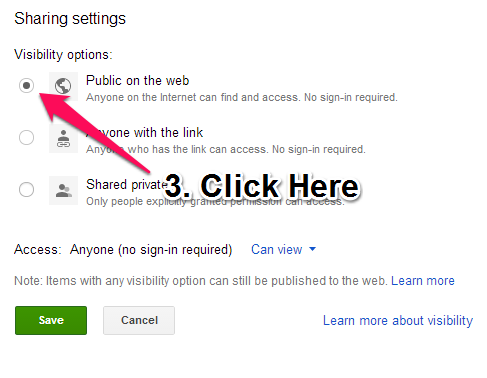
  4. Find document in Google Drive, select it, and then hit share.  Under the "Who has access" section, click on the "Change" link.
  5. Click on the "Public on the web" radio button, then click "Save."
  6. Distribute the resulting link.  Copy and paste it into your favorite electronic platform.

    I would use the Google URL Shortner to make communication easier.  Bitly also works nicely.
    See the Wikipedia article on URL Shortening here:  URL Shortening
  7. Resolve to print fewer pieces of paper.

Thursday, January 30, 2014

Whiteboard Markers: An Experiment in Color

Yesterday, I tried to create a simple model for solving Hardy-Weinberg equations.  It was complex and it was a reach for many of the students.

For today's review, I attempted to use a bit of color to differentiate the parts of the steps.  I'm hoping it will be valuable for students to see the different parts.


Sunday, January 19, 2014

Week 1 Review

Here's a shot-gun post about my thoughts over the past week of Student Teaching.

  1. There's a great opportunity to leverage technology.  This one sounds trite and overblown, but the specific win I see is this: Teachers can, and should, post homework, worksheets, notes, lectures, rubrics, and almost anything else to a place where students can access it online.  I see the biggest opportunity with students who need to make up homework.  This type of system also benefits a classroom's transparency. I believe that if the content is posted behind a student login there won't be issues with copyright.
  2. Students need to be taught how to take notes.  During the PowerPoint notes, the students wrote every word on every slide.  Not knowing what to write down takes up a lot of class time; quick scribes are left idle while slower scribes take their time.  Teaching note-taking must be added to my literacy planning in the future.
  3. Pick Battles. Between activities, I noticed students checking their cell phones.  I don't mind it.  It doesn't distract from anything during class, and cell phones will eventually have a prominent place in education.  For the time being, I'll follow the lead of my master teacher, but in the future I don't think I'll make it an issue.  If handled strategically, the students can begin to use their phones as a tool for in-class learning (spelling, fact checking, quick research, etc.) and should be held to that standard. There are other issues that I have noticed teachers come down hard on that don't seem to be that important.
  4. Modeling is Vital - It took about 10 minutes to model how we wanted a particular assignment done.  The students were able to complete the assignment.  Only one student asked "What do you want us to do again?"  10 minutes saved answering questions unrelated to content.
  5. Prep Period is Gold - Thou shalt not squander thy prep period.
That's only five things, but there are more I'll write up in more detail later.  I'm having fun, I'm teaching the standards (and then some), and students are making connections.  I am looking forward to getting paid to do this!